Drawing review
Mark up, comment on and approve drawings
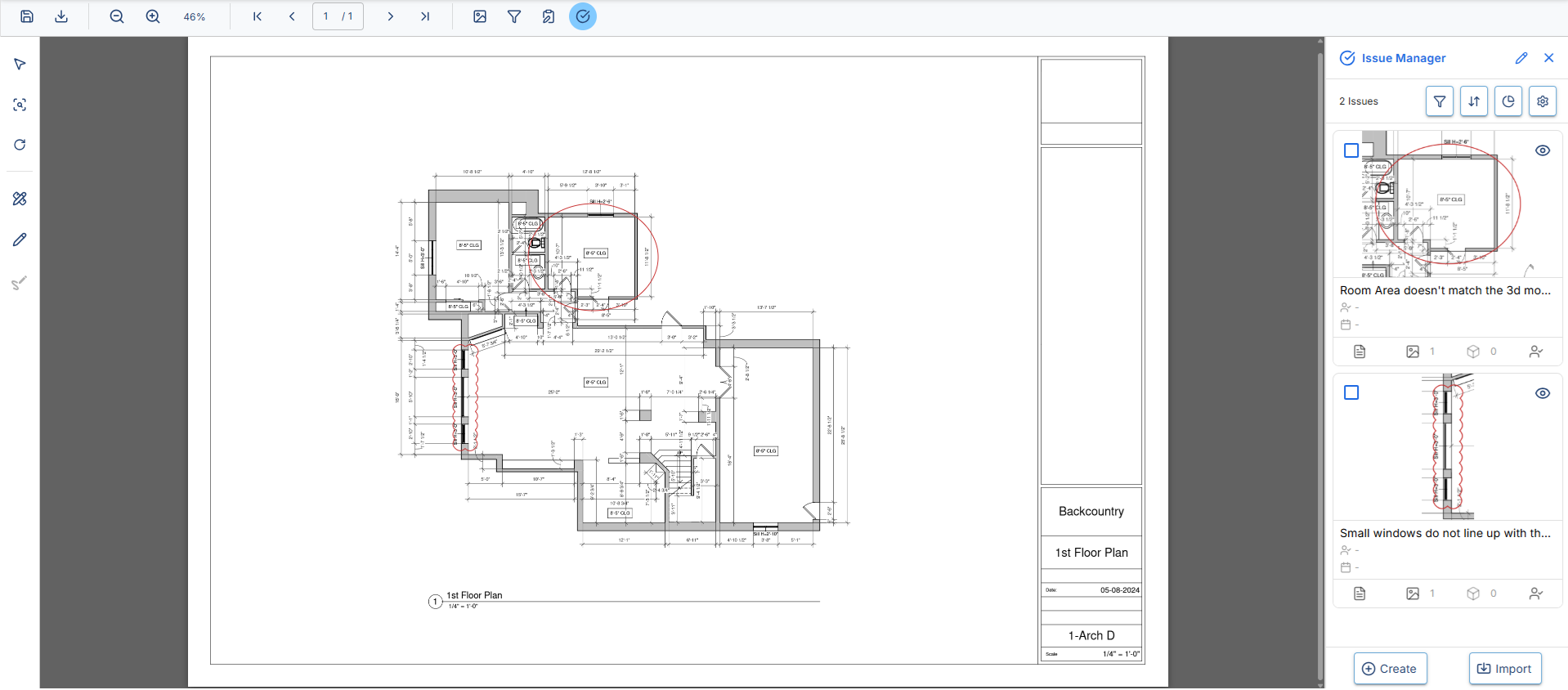
PDF drawings are reviewed in the same workspace as the models. A finding on the sheet becomes an issue linked to the element in the model. Markups stay structured rather than locked inside a file, can be copied between sheets, and export together with the drawing.
- PDF and DXF
Uploaded PDF files are reviewed, and so are drawings that come from DXF.
- Issues raised on the sheet
A problem is raised on the drawing as a real issue and linked to the element in the model, instead of staying a note inside the PDF.
- Mark up and measure
Notes, dimensions and stamps straight onto the sheet, in their own layer above the drawing.
- Compare two revisions
Old and new sheet over one another, with the differences highlighted.
- Automatic signature
Signature fields are placed on the sheet once and filled in automatically on approval. They are locked afterwards and cannot be altered.
- Export with markups
A drawing can be exported with all its markups and passed on outside the project.
BCF is made for the model. Here it carries the drawing too.
Issues travel between programs as BCF, an open standard from buildingSMART written for the three-dimensional model. A finding on a drawing usually falls outside it, but not here: it is carried as a full BCF topic without leaving the standard. So an issue can be raised on the model and later gain a view from the drawing.